


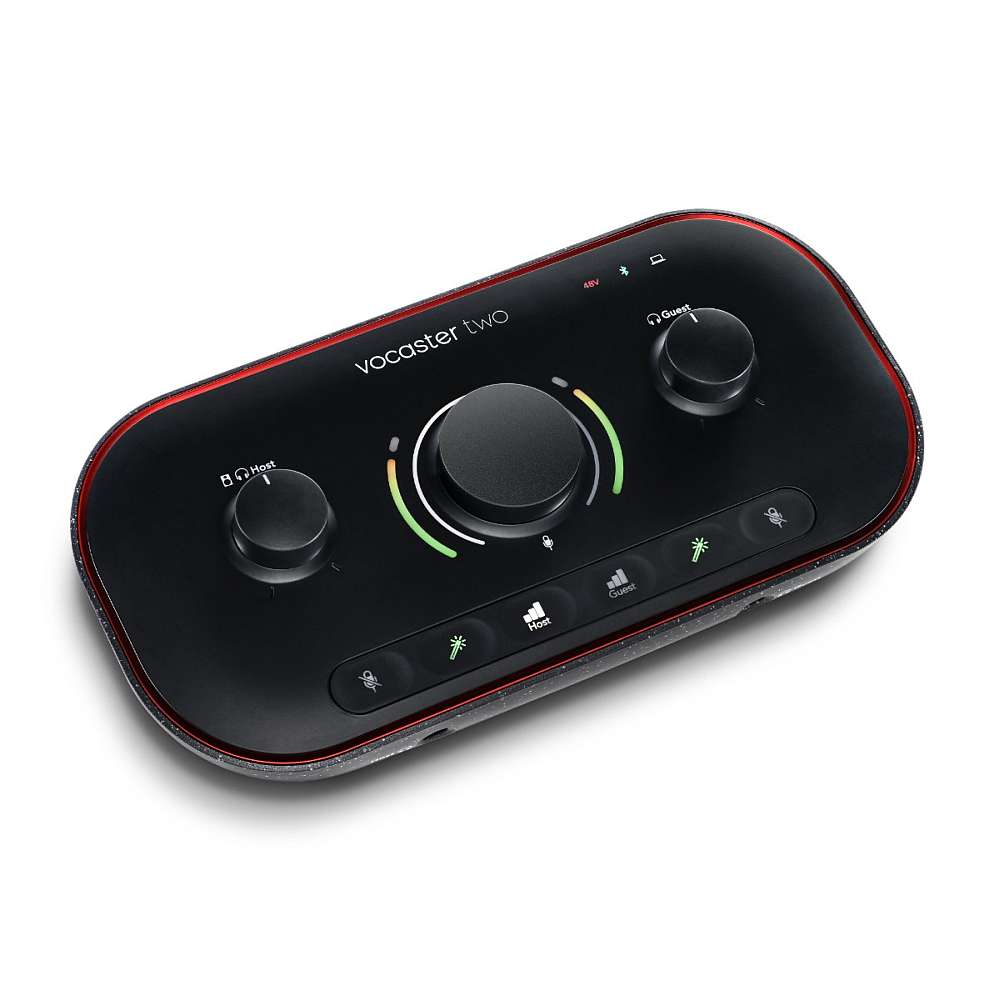


Focusrite Vocaster Two USB-C Podcasting Audio Interface
₨65,000
- Podcasting, Streaming & Content Creation
- Bus Powered / Mac, Windows, iPadOS
- 2 High-Gain Mic Preamps with Auto Gain
- 2 Headphone Out, Stereo Monitor Out
- 24-Bit / 48 kHz AD/DA Conversion
- Guests/Phone Audio via Bluetooth or TRRS
- 48V, Easy Start and Mute Button
- Loopback Mode, Voice Presets
- TRS Output for Feed to Camera
- Hindenburg Lite, Acast Influencer
While any interface is sure to get the job done, why trust your podcast projects to anything other than an interface designed for precisely that? Enter the Focusrite Vocaster Two, a USB-C Audio Interface delivering crystal-clear audio with several features onboard to fine-tune your sound to perfection.
At first glance, the Focusrite Vocaster Two may seem like any other portable interface; however, deeper inspection reveals several incredible features setting this interface apart from others in its class.
On the surface, the Vocaster Two boasts a gain knob with over 70dB on tap alongside a volume knob for dialing in perfect monitor and headphone levels.
Where the Vocaster Two really starts to shine is with regard to its onboard buttons, with Auto Gain and Enhance functions for each channel to bring out the best in every word and a handy Mute button for cutting out pesky sounds before being recorded.
Flip around back, and you’ll encounter several connectivity options, including Bluetooth and TRRS for connecting to phones, a TRS input for connecting cameras, and more. Kick your podcast recording quality up more than a few notches with the Focusrite Vocaster Two.
Optimize your sound straight from the source
Not only does the Focusrite Vocaster Two make recording podcasts a breeze, but Focusrite loaded this interface with a handy set of buttons tailor-made to give your recordings that studio shine from the source.
To start, the Vocaster Two supplies more than a whopping 70dB of gain, compatible with a wide range of microphones without the need for a booster.
With the Auto Gain function, setting gain levels for either mic is a cinch — just push the button, start talking, and Vocaster Two will handle the rest! The Enhance function offers three different podcaster-focused presets, each tailor-made to bring out more of the natural qualities of your voice.
Whenever unwanted noises creep into the signal, a handy Mute button silences all sound sources in an instant, ensuring audiences can focus on your content without distractions.
| Form Factor | Desktop |
|---|---|
| Analog Audio I/O | 2 x XLR 3-Pin Balanced Mic Input |
| Host Connection | 1 x USB-C (Class-Compliant) |
| OS Compatibility | macOS |
| Power Requirements | AC/DC Power Adapter (Not Included) or USB Bus Power |
| Display | None |
| Channels of I/O | 2 Inputs / 2 Outputs |
| Maximum Sampling Rate | 48 kHz / 24-Bit |
| Number of Microphone Preamps | 2 Preamps |
| Built-In Microphone | None |
| Input Level Adjustment | 1 x Knob |
| Expansion Slots | None |
| Pad | None |
| Gain/Trim Range | Up to 70 dB |
| Solo/Mute | Mute per Input Channel |
Only logged in customers who have purchased this product may leave a review.
Related products










Reviews
There are no reviews yet.